


eBay Motors: Parts, Cars, more
4.01.94K Reviews
App Specs
- Version
- 4.67.0
- Updated On
- License
- Free
- Downloads
- 1,000,000+
- Developer
- eBay Mobile
- Categories
- Auto & Vehicles
- Platform
- Android, iOS
Screenshots
 Analysis by AppCompare
I’d think of eBay Motors as a shared research tool as much as a place to shop. A household can use it to look up a replacement mirror, compare listings for a project car, or keep an eye on parts for a vehicle everyone drives. The useful part is having a broad automotive marketplace in one app; the catch is that shopping decisions, saved items, and account activity still need clear ownership when more than one person uses the same phone.
Start with one person’s search, not a shared login
When I’m looking for a part with someone else, I prefer to agree on the exact vehicle and the job first, then search from one account. That keeps saved listings and alerts tied to the person who will actually follow up. If everyone signs in on a shared device, it is easy to lose track of whose watch list or purchase activity is on screen, so I would treat the account as personal even when the car is shared.
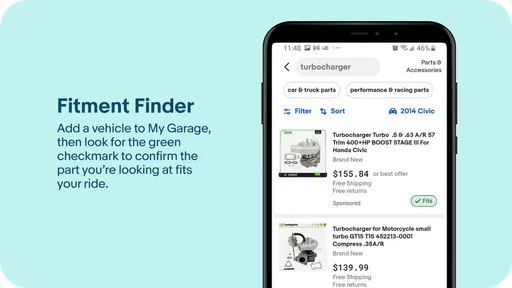
A practical workflow is to keep a short note of the vehicle’s year, make, model, trim, and any relevant part details before browsing. Then use those details to narrow results and share promising listings with the other person for a second look. This is especially helpful for parts that appear similar in photos but differ by fitment. I would still check a seller’s listing carefully and confirm compatibility before buying; a search result is a starting point, not a guarantee that a part fits.
Coordinate before a listing disappears
Shared projects often involve a small decision chain: one person spots a listing, another checks whether it is the right part, and someone else handles the purchase. Agreeing in advance on who has the final say and who is responsible for payment avoids duplicate orders and rushed bids. For auction listings, that conversation matters even more because bidding can move quickly and a tempting price is not the same as a sensible total cost.
I also find it useful to compare a few candidates rather than sending one appealing result as if it were the only option. Look at condition, photos, seller details, shipping, and return terms together. A cheaper listing may be less attractive once delivery or uncertainty about condition is considered. For a major vehicle purchase, I would use the app to discover and compare options, then take the time to investigate the car and seller independently before committing.
Who benefits most from a mobile motors marketplace
This is a natural fit for people who already know what they are searching for: owners tracking down a specific component, hobbyists browsing project vehicles, and drivers who want to compare offers while away from a computer. The mobile format is particularly convenient when a repair is underway and you need to check a listing against the old part or discuss options with someone nearby.
It is less suited to someone who expects every listing to be a curated recommendation or who wants a mechanic to diagnose the problem inside the app. If you are unsure what failed, get the diagnosis first; searching broad terms can bring up many plausible but unsuitable items. And if your priority is an in-person inspection before discussing a car, a local dealer or a nearby seller may be a better first stop than a marketplace listing.
Worth Reading Before You Choose

EA SPORTS FC Mobile 26 Is a Bigger Football Game, but It Takes Time

Flipboard Shows What News Apps Must Do Beyond the Feed

Switching to Android Auto Means Rethinking Your Driving Routine

Google Calendar Makes a Crowded Week Easier to Manage

Ludo King Makes the Most of the Minutes Between Plans

Baby Panda World Brings Quick Play to Modern Phones, but Its Game Library Feels Busy
Compared with general shopping apps, eBay Motors keeps the focus on vehicles and automotive parts, which makes it easier to approach a car-related search as its own task. Compared with a local classifieds service, it can be useful when you want to browse beyond nearby options, while local listings may be preferable when seeing a car or bulky part in person is essential. Neither route removes the need to verify condition, fit, and seller terms.
Age, trust, and a sensible household boundary
The app is rated Teen, but I would not treat that age label as a substitute for adult judgment around expensive purchases. A teenager might help research a part or compare listings, while an adult handles account access, bidding, and payment decisions. I would also avoid leaving a signed-in shopping account open on a device that several people use, especially if anyone could make a purchase without checking with the household first.
Trust comes from checking the details, not from assuming that a familiar marketplace makes every listing equally safe. Read the description closely, inspect all available photos, and ask the seller focused questions when something important is unclear. For cars, do not let attractive photos or a persuasive description replace an independent inspection and a careful review of the vehicle’s paperwork. Buyer protections can offer reassurance, but they are not a reason to skip basic checks.
For Android users, the app is free, is published by eBay Mobile, and currently lists version 4.54.0 with Android 8.1 as its minimum operating system. It has a 4.0 average from around 6,400 ratings, with about 1,900 written reviews, and has passed over a million installs. Those figures suggest that it is an established option, though they do not tell me whether a particular seller or item is right for a specific purchase. Its Teen rating is another reason to keep costly transactions under adult oversight in a shared household.
Hey there, fellow car enthusiast! So, I recently had the chance to dive into the eBay Motors: Parts, Cars, more app, and let me tell you, it’s like a playground for anyone who loves wheels and deals. Whether you're on the hunt for a new ride or just looking to pimp out your current one, this app might just be your new best friend.
First Impressions: Setting the Wheels in Motion
Once I fired up the app, I was immediately struck by its clean and intuitive design. Navigating through the different sections felt like a breeze. The developers clearly put some thought into making sure even the most tech-challenged among us can find what they need without a hitch.
The home screen greets you with a variety of options, from browsing whole vehicles to diving deep into specific parts. It’s like walking into a massive, virtual auto show. And if you're anything like me, that’s kinda exciting!
Features that Keep You Rolling
One of the standout features is the search functionality. Whether you're looking for a rare part or a specific model, the filters let you narrow down your search by make, model, year, and even more granular details. It’s super handy, especially if you know exactly what you're after.
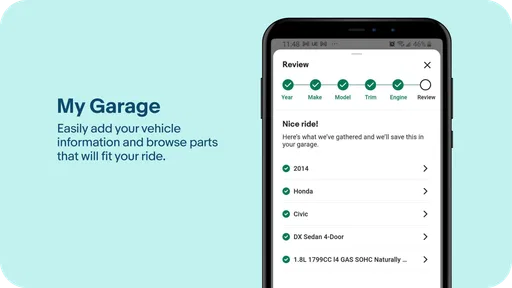
And then there’s the "My Garage" feature. I found this particularly nifty. You can save your vehicles in a virtual garage and get personalized alerts and suggestions based on your selections. It’s like having a personal assistant keeping an eye out for deals that matter to you.
Revving Up the Buying Experience
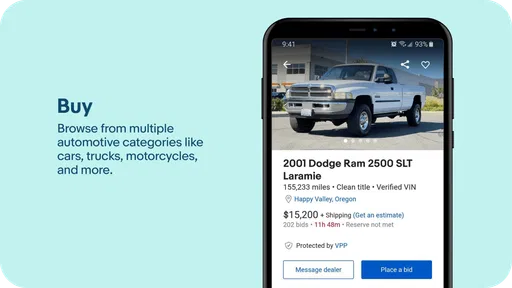
Shopping for cars? The app provides detailed listings with photos and comprehensive descriptions. It felt reassuring to see such transparency. Plus, the app integrates seamlessly with eBay’s renowned bidding system, so if you’re feeling competitive, you can bid on the go!
For those of us who are a bit cautious, the buyer protection features offer some peace of mind. It’s nice knowing there’s a safety net when you’re making such significant purchases.
Parts Galore: A DIYer's Dream
If you're more of a DIY mechanic, you’re in luck. The app boasts an extensive range of parts and accessories. From engines to exhausts, and everything in between, it’s all there. The app even offers installation kits and guides for some items. So, if you’re into getting your hands dirty, you’ll have everything you need.
And let’s not forget about the price comparison tool. It’s a lifesaver for anyone trying to snag the best deal. You can compare prices from different sellers, ensuring you always get the most bang for your buck.
The Social Element: Join the Community
Another cool aspect is the community feature. You can connect with fellow car lovers, share tips, and even get advice on your next purchase. It’s a fantastic way to feel part of a community, especially if you're new to the car scene.
Vroom into the Future
In conclusion, the eBay Motors: Parts, Cars, more app is a solid choice for anyone invested in the automotive world. Whether you’re buying, selling, or just dreaming, this app provides a comprehensive platform to explore all things automotive.
So, if you're ready to dive into a world of cars and parts, give it a spin. Who knows, your dream car or that elusive part might just be a tap away!
Pros
- Wide selection of car parts available.
- User-friendly interface for easy navigation.
- Secure payment options for peace of mind.
- Detailed product descriptions and images.
- Efficient customer support and service.
Cons
- Some listings may have high shipping costs.
- Occasional delays in order delivery.
- Limited seller ratings and reviews.
- App notifications can be overwhelming.
- Requires frequent updates to fix bugs.
FAQs for eBay Motors: Parts, Cars, more
What is eBay Motors and how does it work?
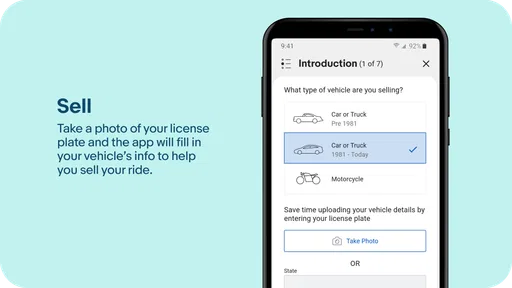
eBay Motors is a specialized section of the eBay platform focused on buying and selling vehicles and automotive parts. Users can browse listings for cars, motorcycles, and parts, and participate in auctions or buy items directly. The app streamlines the process by providing filters, notifications, and secure payment options.
Is eBay Motors available on both Android and iOS?
Yes, eBay Motors is available on both Android and iOS platforms. Users can download the app from the Google Play Store for Android devices or the Apple App Store for iOS devices, ensuring a wide range of compatibility with different smartphones and tablets.
What payment options are available on eBay Motors?
eBay Motors supports various secure payment options, including PayPal, credit cards, and eBay's own managed payments system. These options provide flexibility and security, ensuring that both buyers and sellers have a reliable transaction experience. Always check the seller's accepted payment methods before purchasing.
Are there any fees associated with using eBay Motors?
While browsing and downloading the eBay Motors app is free, there may be fees associated with listing items for sale or making transactions. Sellers typically incur listing fees and final value fees, while buyers should be aware of any potential shipping costs. It’s important to review eBay’s fee structure before listing or purchasing items.
How can I ensure the authenticity of parts and vehicles on eBay Motors?
To ensure authenticity, always check the seller's ratings and reviews, and verify the item description against provided photos. eBay Motors offers a Vehicle Purchase Protection program for eligible transactions, safeguarding buyers against fraud and misrepresentation. Communication with the seller for additional verification is also recommended.


